Seamless Floral Border: A Versatile Design Asset Done Right
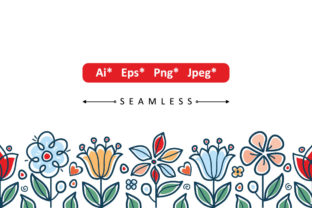
Seamless Floral Border is a popular design element used across digital and print media. Whether you're creating social media graphics, invitations, website headers, or packaging, this type of border offers a decorative yet functional way to frame your content. It’s designed to repeat seamlessly without visible edges or breaks, making it ideal for backgrounds, dividers, or ornamental accents.
However, many users—especially beginners—run into issues when selecting or applying a Seamless Floral Border. From compatibility problems to improper scaling, these mistakes can affect the final look and usability of your design. Let's explore some of the most common pitfalls and how to avoid them.
Choosing the Wrong File Type Without Understanding Its Use
One of the first decisions you’ll make when downloading a Seamless Floral Border is choosing the correct file format. Most packages include .EPS, .JPEG, and .PNG versions, each with its own purpose.
- .EPS (Encapsulated PostScript) is ideal for vector-based editing. If you're using Adobe Illustrator or another vector program, this file allows you to resize without losing quality and edit individual elements like color or stroke.
- .JPEG is a compressed raster image. It’s great for web use or when you need a quick preview but not for detailed editing since it doesn’t support transparency.
- .PNG is high-resolution and supports transparency, making it perfect for overlaying on different backgrounds, especially in web or print designs where clean edges are essential.
Mistakenly using a .JPEG when you need transparency or trying to edit a .PNG in a vector program can lead to frustration and poor results. Always match the file type to your intended use and software capabilities.
Overlooking Scale and Resolution When Applying the Border
Even with the right file type, improper scaling can ruin the look of a Seamless Floral Border. Vector formats like .EPS maintain quality at any size, but raster files like .PNG and .JPEG can become pixelated if enlarged too much.
For example, stretching a 500x500px .PNG border to fit a 2000x2000px layout may result in blurry edges and a loss of detail. Always check the original resolution and scale accordingly. If you're unsure, start with a larger image or use the vector version to avoid quality loss.
Not Testing the Seamless Repeat Before Final Use
The defining feature of a Seamless Floral Border is its ability to repeat without visible seams. But not all designs are created equal. Some borders may have subtle misalignments that only become obvious when tiled across a large area.
To avoid this, test the repeat in your design software before applying it to a final project. Create a small document, place the border, and duplicate it side by side. If you notice any mismatched patterns or color shifts, the border may not be truly seamless. Reach out to the provider for a better version or choose a different design.
Ignoring Color Compatibility With Your Project
Many Seamless Floral Border downloads come in a default color palette that may not match your brand or design. While .EPS files allow for easy color editing, .JPEG and .PNG files are static unless you manually adjust them in a photo editor.
One common mistake is assuming you can easily change the color of a .PNG file in a basic design tool like Canva or PowerPoint. This often leads to poor results. Instead, use a program like Photoshop or GIMP to recolor the border accurately. Alternatively, opt for the .EPS version if color flexibility is important for your project.
Using the Border in the Wrong Context
While a floral border adds charm, it's not always appropriate. Using a decorative Seamless Floral Border in a corporate presentation or minimalist branding piece can clash with the intended tone.
Consider the context and audience before applying the border. A soft watercolor-style floral border may work beautifully on a wedding invitation but could feel out of place on a tech startup’s website. Choose designs that align with your message and visual identity.
Downloading From Unreliable Sources
Free downloads are tempting, but they often come with hidden issues: low resolution, limited usability rights, or even embedded malware. Always download from reputable platforms that clearly state licensing terms.
For instance, a free Seamless Floral Border from a sketchy site might only be licensed for personal use. If you unknowingly use it in a client project or commercial product, you could face legal consequences. Always read the license agreement and, when in doubt, invest in a premium version from a trusted source.
Overcomplicating the Design With Too Many Borders
Another common mistake is layering multiple borders or combining them with too many other design elements. A Seamless Floral Border should enhance your layout, not overwhelm it.
If your design already includes floral illustrations or intricate backgrounds, adding a floral border might create visual clutter. Instead, use it as a subtle framing element. Pair it with clean typography and minimal accents to let it shine without competing for attention.
What to Check Before Downloading or Using a Seamless Floral Border
Before committing to a Seamless Floral Border, ask yourself the following:
- What file formats are included? Make sure the download includes the format that suits your software and usage needs.
- Is the border truly seamless? Preview how it tiles to avoid visible seams in your final design.
- What are the licensing terms? Confirm whether it's free for commercial use or requires attribution.
- Can I edit the colors and size? If customization is important, choose a vector format like .EPS.
- Does it fit the tone of my project? Ensure the border complements your overall design style and audience expectations.
Final Thoughts: Make the Most of Your Seamless Floral Border
When used correctly, a Seamless Floral Border can elevate your design with minimal effort. It offers a timeless aesthetic that works across a variety of projects. But like any design asset, its value depends on how well you understand and apply it.
By avoiding common mistakes—like using the wrong file type, ignoring resolution, or overlooking licensing—you’ll ensure your final design looks polished, professional, and purposeful. Take the time to test, adjust, and choose wisely, and your Seamless Floral Border will be a reliable and beautiful addition to your creative toolkit.